
iMessage
I did research on Gen Z's iMessage user experience, the system's most active users, with a team of 3 conducting primary user research and interface design. I discovered users are overwhelmed with the bombardment of text messages they receive daily, therefore value being able to locate past messages easily.
Our recommendations are for iMessage to implement more filter settings, in-chat search, and saving messages to media library.
Project details
Tools
Team
Year
Product Design
UX/UI Design
UX Research
Wireframing
UX/UI Prototyping
Figma
Optimal Workshop
User Testing
Mural
2025,
MHCID Project
Kayla Nguyen, UXR + UXD
Elise Maddox, UXR
Matea Montanaro, UXR + UXD
iMessage is under growing pressure to stay relevant, especially among their most active demographic, Gen Z
Top competitors like Instagram and Snapchat now have instant messaging, multi-media and hybrid social elements, making it more competitive for iMessage to be Gen Z's primary messaging platform.
iMessages' limitations in message history, conversation navigation, and continuity impact satisfaction among users.

Gen z's world of texting
Gen Z teens prefer texting as their top choice for communication and are highly engaged texters.
48% check texts 10x daily
25% check texts 20x daily
Source: Simple Texting, 2024
62%
of young people (ages 15-24) use iMessage as a form of messaging
Source: Year 31, 2021
The volume of texts, incoming and outgoing are increasing and varying
The definition of 'texting' has evolved into a nuanced means of communication beyond simply sending typed messages to others.
What are they receiving?
Multimedia
Purchase Confirmations
Event Plans
Two-factor Authentication
Delivery Notifications
Complex Content
What are they sending?
Friends + Family
Education Providers
Businesses
Tech Support
Scammers + Spam
Global Communities
TLDR of the problem at hand:
Despite having many means of communication, users still face hurdles in feeling connected with others.
I realized that despite having a variety of ways to connect, users encountered struggles of feeling truly connected.
While synthesizing our data, an insight came to me that would go on to become the overall theme of our research: "Don't let technology get in the way of connection."
In other words, we should build technologies that make communication easier, not create more structural or systemic barriers.
My Lightbulb Moment
.png)
Our research approach

So what problems are users facing?
They feel bombarded by various types and volume of texts, leading to messages being unorganized.
User struggle but strongly value being able to locate past messages in addition to media.
Being bombarded by texts is hard to keep up with
Multiple issues are contributing to this feeling of overwhelm.
Significant amount of unread text messages
Current system organization misaligns with mental model
Minimal effort to clean inbox
😰
Many sources for texts
Stress about unread text messages
Social pressure to respond
25%
of users find it very difficult or somewhat difficult to manage the quantity of texts received
30%
have 50+ unread text messages
Source: Card Sort Test
Messages are getting lost and coming from many sources...
“I don't...I mean, I, like I said, my favorites at the top of my iMessage. Other than that...other messages kind of get lost.”
Source: Qualitative Usability Test 1

friends + family
spam
delivery notifs/
authenticity codes
98%
receive alerts via text
Source: Card Sort Test
and 46%
receive spam texts weekly or more frequently
Source: Quantitative Usability Test 2
business
current iMessage UI
...all while there is a social pressure to respond and there is stress about unread texts
41%
agree or strongly agree that they feel pressure to respond quickly to maintain relationships
39%
have considerable, high or overwhelming stress with 50+ unread texts
32%
agree or strongly agree that delayed responses have caused tension in their relationships
Source: Quantitative Usability Test 1
Despite this, cleaning up the global inbox is not a priority, with almost half of our participants never or rarely cleaning out their message inbox (40%).
Source: Quantitative Usability Test 2
As a result, it is imperative that users are able to organize their texts so they can efficiently receive and retrieve necessary texts.
While analyzing the data from the Card Sort and Quantitative 1 test, it surprised me how many users agreed in feeling stress, social pressure, and a need to respond in a timely way in relation to texting.
This led me to infer that there might be a larger issue: could this be partially due to the user controls and limitations of organizing the message inbox? It was evident that the current system of iMesssage does not match users' mental models of how to organize and store their texts.
My Lightbulb Moment
The current system of iMessage does not match user’s mental models
Our card sort revealed that people are mentally organizing their messages in a more nuanced way than the current interface allows for.
There is an urgency to respond
Single-use messages are filling the inbox
Spam is unwanted
Added layer of social context to messaging
Our recommendations:
Inbox message filters
A customizable filter bar in the message inbox makes filters accessible and seamlessly blends with the preexisting interface.

This design enabled users to find un-named group messages with 14% more accuracy than the baseline interface.
The creation of these tabs allow for better organization by types of conversations that are better aligned with how users mentally perceive their texts.
Tab display on message home interface.
Tabs informed by Card Sort test.
New filter settings
Toggle settings allow for optimal customization of message list organization and for better visibility of unread messages.

Chat searchability
There are currently 3 ways to find past messages:
Scrolling
Searching
Media Library
Users experience difficulty navigating chat history via scroll
Half of users manually scroll up in their chat to locate past messages, with 12% of them scrolling up every time.
Source: Quantitative Usability Test 1

“I definitely go to the attachment section first under the person's like profile, but if that doesn't work, I'll scroll up in all of the text messages. So sometimes that can be frustrating.”
Source: Qualitative Usability Test 1
Global search is not efficient for Gen Z's texting habits
Once again, the current system of iMessage does not match user's mental models.
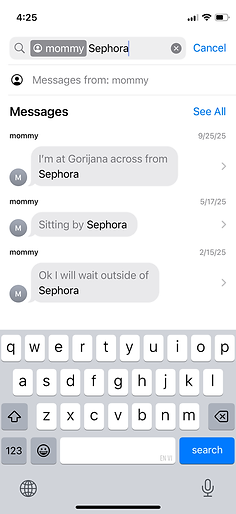
The only way to narrow down search results outside of global searching is to use iMessage's filters/tags, still utilizing the search bar.

Global search interface (based on keyword)
Search filter with 'tags'
To search content/keywords within a conversation or with one person:
-
Users still have to use the search and type the person's name
-
Select "Messages with" or "Messages in"
-
Then click on the other criteria correlating with the search


48% of users expressed they rarely use tags and 29% never use it
Source: Qualitative Usability Test 1
“Messages are definitely the hardest because, um, because you just like have to remember specific words that you use in text and search those up.”
Mentioned 4 times in Qualitative Test 1
What do you users enjoy for retrieving past messaging media?
Users found the media library to be a highly efficient to access past media and links from chats.
6/6
testers in our Qualitative 1 test brought up the Media Library first when talking about finding images

Media library with history of photos/videos & links
Media via texts represents more than just images, videos, and links
These elements of messaging deliver connection and emotional meaning in text exchanges.
“ I think what makes it meaningful is it's easy to...send pictures...emojis or links.
Mentioned 3 times in Qualitative Test 2
The media library is a great archival tool for finding specific types of media in chat...but how can it be improve further?
Linked content
Compared to competitors, iMessage excels in sending multi-media, but is not as easy to locate in chat history as it is to send.
6/6 top competitors offer some form of linked message/media to chat history.

“I don't like that once you click on image there's no way to like view where it was in the conversation...it'd be a lot easier to find certain parts of conversations if you could find certain images.”
Mentioned 3 times in Qualitative Test 2
No way to link back to original place in chat
Comprehensive library
Text messages are not findable in the media library compared to photos, videos, and links.
Sent in chat
Text messages
Images
Videos
GIFs
Stickers
Links
Available in media library
Images
Videos
GIFs
Links
Text messages
Stickers
Multiple users expressed frustration in not being able to see where media was sent in chat history.
This highlighted the value in not only exchanging texts, but being able to store and retrieve them effectively. We wanted to dig deeper on how users currently find past messages and in turn optimize findability.
My Lightbulb Moment
How users currently locate past messages:
Scrolling
is laggy, inefficient, and frustrating.
Global Searching
is too board and tags are unused. There are also discrepancies in keyword searching success rates.
Media Library
is loved for its efficiency, but is not comprehensive of all chat content and is disconnected from messaging history.
What can we do to make iMessage more usable and make finding past messages easier?
In-chat search
Targeting where users already look for chat content: the media library.
Users can access individual chat searching by clicking on the contact profile. They can search for previous texts and view the media library.
“ Oh my gosh, I love it. So I can search, right? It's very clear at the top...you can search by text image, video link, PDF gifs stickers. Oh, this is amazing.”
Qualitative Test 2

In-chat search: filters

Within in-chat searching, there are also filters available to optimize findability.
Unlike search, filters require no "key-word" and allow findability through browsing.
“At the top I'm really excited about the fact that you can search. It looks like you can search text or images or basically anything else, which is really exciting.
Qualitative Test 2
Saving messages to the media library
Users can save individual text messages by long-pressing on individual messages
“There’s been so many times like important information like your dad sends you the new wifi password...You don't have to search through messages (or) ...scroll through everything that might have been sent with that same keyword.
Qualitative Test 2
3/6
Qual 2 participants screenshot messages to save them

'Save Message' function

See all saved messages in media library
Users can apply filters for better findability of their saved messages based on message format (text, image, video etc.)
“My final thoughts are I love this saved messages feature... definitely look forward to something like that being implemented.
Qualitative Test 2
Link-back to saved messages
Finding messages easier by connecting the media library contents back to the original place in the chat history
